30 Day Money Back Guarantee

Buy with the confidence of a

30 Day Money Back Guarantee

 
Buy
>> Buy Bulk Image Downloader
>> Buy WizKey
>> Buy SASA
>> WizMouse Donation
Why pay?
Download
BID 3.16.0.0 BETA (NEW!)
Bulk Image Downloader
BID Chrome Extension
BID FireFox Extension
WizKey 1.5.0.3 (NEW!)
WizMouse 1.0.0.9
SASA
Route Sentry
DDProxy
Support
BID User's Guide
BID FAQ
Lost Registration Codes
Contact
Search
Main Menu
Home
News
Fun
FAQs
Affiliate Login
Affiliate Signup
Privacy Policy
Reseller Login


Lost Password?
Print E-mail

Click to Download BID Download Bulk Image Downloader 3.15.0.0 [4.9MB]

Works on Windows 9x, ME, NT, 2000, XP, Vista and Windows 7 - Free 30 Day Trial - BID User's Guide - What's New in this version? - Buy Now
(Registered users please note that the new installation will upgrade your existing registered copy. No need to uninstall first and/or re-register).
 

Download FULL SIZED images from almost any web gallery or web forum, quickly and easily!


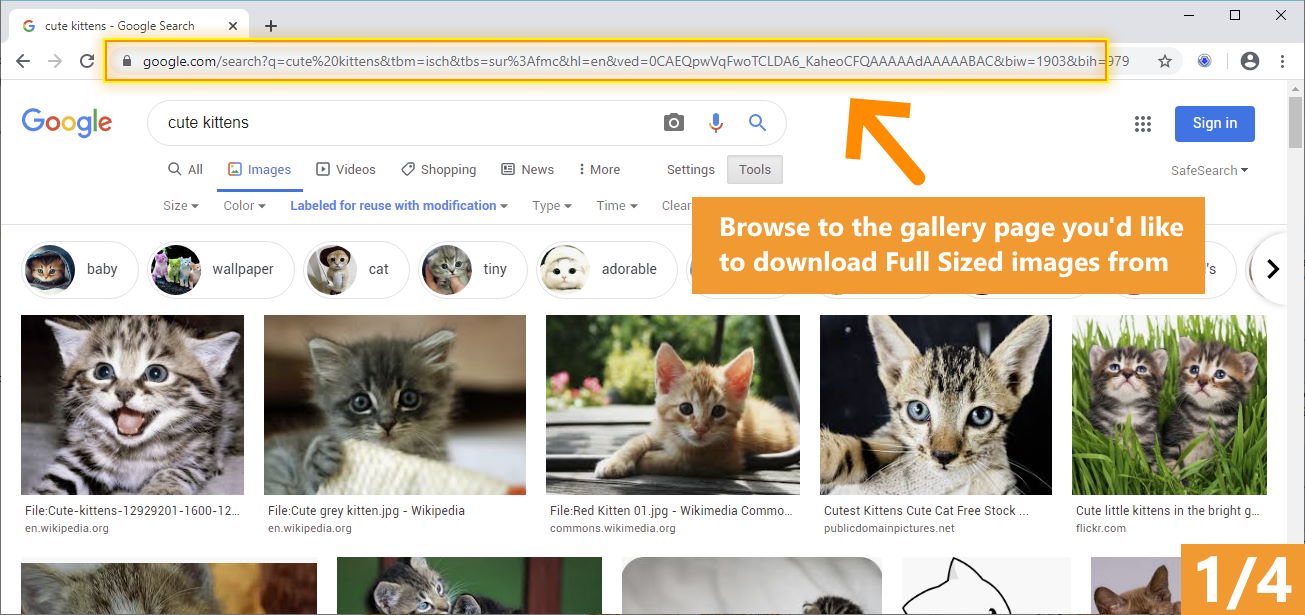
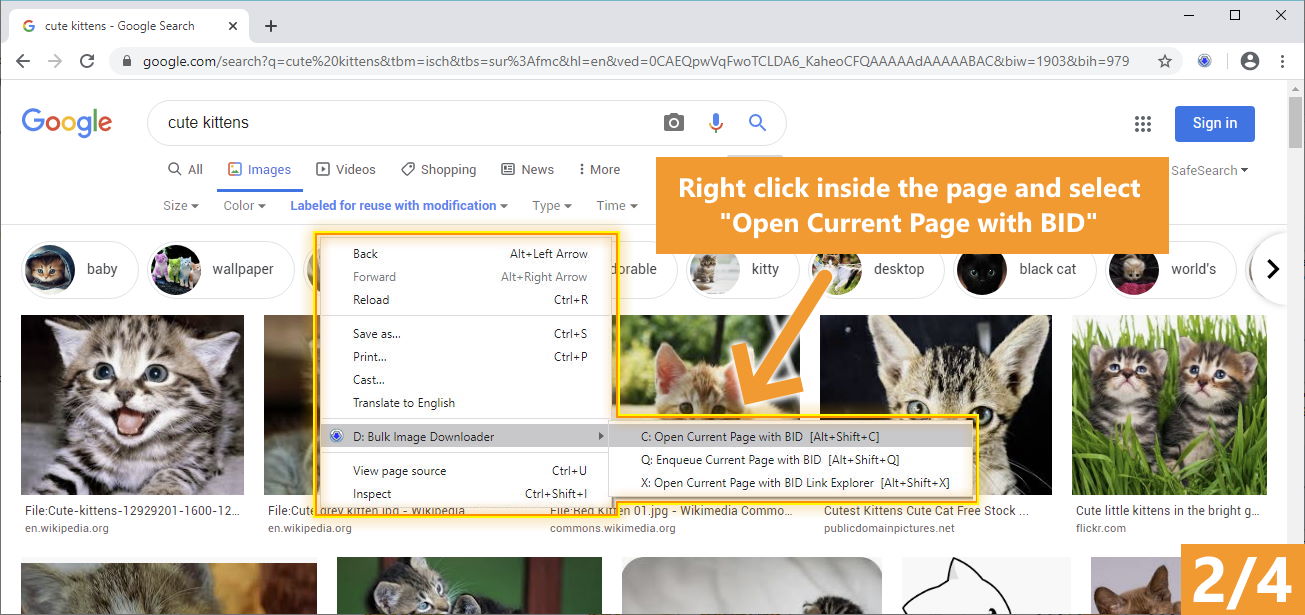
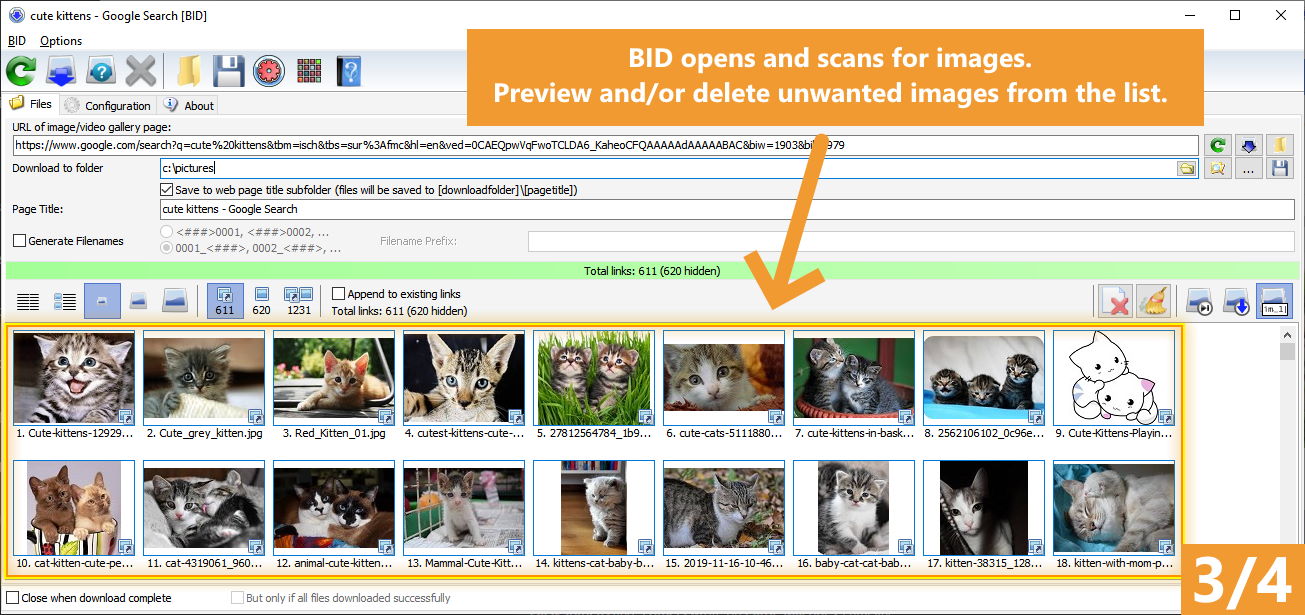
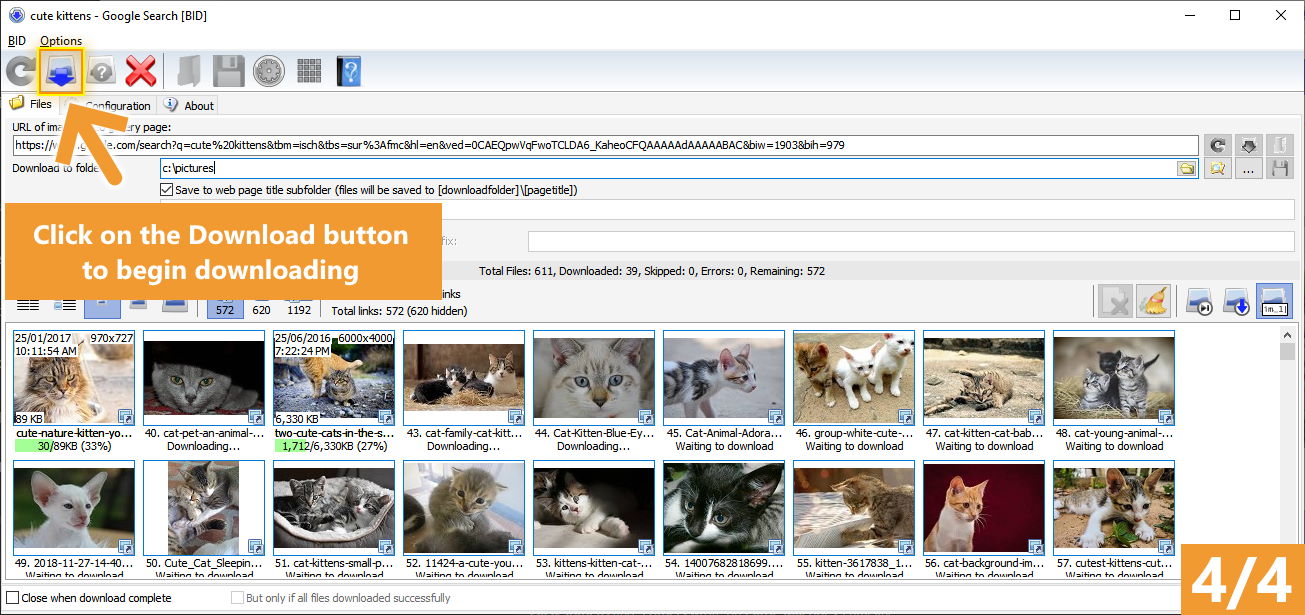
Download images from web galleries in 4 easy steps

Download a complete web gallery in just 4 easy steps


BID is regarded as a "must have" tool by all serious image collectors. Try it today!

  • Save Time
    No more endless clicking and right clicking to "save image as..."

  • Save bandwidth
    BID cuts through all the adverts, popups and redirections and just downloads the images.
 
  • It just works
    No complicated configuration or project files need to be set up. BID works on most popular gallery types straight out of the box.
 
  • You're in control
    Images can be previewed as thumbnails or in full size before any downloading takes place. Only download the images you want.
 
  • One tool for all sites
    Stop switching between different downloaders for different web sites. BID does them all.

FireFox
users please install the BID FireFox Extension to enable web browser integration. Chrome users please install the BID Chrome Extension
  
Verdict: "Bulk Image Downloader is an incredible program. It works out of the box and the developer’s are making sure that it stays that way. It is definitely one of the easiest and most convenient image downloadersif not the easiest and most convenient – that is currently available on the Internet. New features are added all the time and the devs are very responsive to customer suggestions." - Martin Brinkmann (ghacks.net)


Features

  • Image Host Support - BID works with almost all popular image hosting sites, such as flickr, imagevenue, imagefap, imageshack, imagebam, etc. 
  • Social Networking Sites - BID supports album downloading from sites such as facebook, myspace, and twitter related hosts like tweetphoto.com, twitpic.com, yfrog.com
  • Full Sized Images - BID uses an advanced heuristic scoring method to locate full sized images. This means BID can work on most galleries automatically, with no user configuration necessary.
  • Batch Downloading -  Automatically download from huge lists of gallery URLs via the integrated Queue Manager.
  • Web Browser Integration - BID integrates with IE, Opera, FireFox and Chrome. Just right click inside your browser window and select "Open current page with BID"
  • Web Forum Support - BID can scan multi page forum threads and quickly extract all image links
  • Multi Page Gallery Downloads - BID can detect and download from most popular multi page web galleries out of the box.
  • Password Protected Websites - BID will prompt for user names and passwords if the web site requires them. 
  • Video Downloading - It's not just for images - BID also supports VIDEO downloading from YouTube, Google Video, DailyMotion, MetaCafe, MegaVideo, YouPorn, PornHub, RedTube, Tube8, MegaPorn, MovieFap as well as directly linked video files (.avi, .wmv, .mpeg, .mov, .flv, etc)
  • Embedded images - Apart from locating and downloading full sized imaged, BID can also download images embedded on a page 
  • Sequenced image filenames (fusker) - BID supports 'ranged' URLs for sequenced image downloading. e.g. http://mysite/pics/image[001-100].jpg 
  • Image Validation - BID checks every image to make sure it's been downloaded correctly. Invalid images are retried automatically.
  • Resume Downloads - BID will resume downloads from the point at which the connection was broken.
  • Multi Threaded Downloading - BID can download up to 50 images at once. Download those galleries quickly! 
  • Redirection Resolution -Some sites use image redirection "services" like imagecash, urlcash etc. to display adverts before redirecting to the imagehost. BID automatically resolves these types of links.
  • File name unmangling - BID will retrieve the correct file name from image hosts that scramble filenames (where possible), such as imagevenue, imagefap. 
  • Generate File names - Optionally create your own sequenced file names for image hosts that scramble the file names,
  • Export Galleries to HTML or BB Code - Quickly generate gallery code suitable for pasting into web forums.
  • Advanced Configuration - BID has many advanced settings for things like Javascript processing, redirection handling, and more  for those tricky galleries that thwart BID's download attempts. We're happy to help out with these settings if you get stuck - just contact us. 
  • ... and more!

Testimonials

Our users really love BID - we know because they've told us! Here are just a few examples of  the unsolicited feedback we've received.

"I enjoy collecting, organizing and editing photos. So you can imagine I have used almost every software option available for each of these categories. When it comes to the collecting/organizing category, your software is unambiguously the best option on the market. It does exactly what I tell it to do, and it does it well. I am very pleased with my purchase." - (Aaron, US) 

"I recently downloaded your trial copy of the image downloader and was very impressed. I have tried others but this blew them out of the water. You made it simple to use and very intuitive. It even knows to change file names! It was well worth the price. I just wanted you to know that I was so satisfied by the trial, I purchased the key the same day. Thank you for providing such a functional trial as well, it shows confidence in your products ability to sell itself. Keep up the good work, I'll check your site often to see what other great stuff you have come up with!" - (Nathan)

"In all honesty, yours is the first piece of software that I've paid for in years. Why? Cause it does exactly what I wanted it to AND at a very reasonable price!"  - (Reb)

"BID is the best downloader by far among it's competitors . Small - Fast - Accurate (does not collect garbage) ." - (Micke)

"Hey I just wanted to day I really love your product. I tried a few other image downloaders and none of them really seemed to work. I downloaded this and was blown away by how quickly I was downloading loads of images!" - (Brodyn)

"I have not regretted paying for your software (I have never paid for software before) for these reasons: it's reliable, great support when I needed it and most importantly it's reasonably priced with genuine beneficial UPDATES! It's great to see things like support for other image sites and auto loading of multiple forum pages - can't wait to see what else you will add!" - (Firas)

Awards

Here are just a few of the awards Bulk Image Downloader has received.


Brothersoft Editor's Pick

 
software.informer editor's pick

Shareware Connection 5/5 stars

 
Soft82.com 5/5
 
 Softpedia guarantees that Bulk Image Downloader is 100% CLEAN, which means it does not contain any form of malware, including but not limited to: spyware, viruses, trojans and backdoors.  Filebuzz.com 5 star award lockergnome.com 5 star rating softsea.com 5 star award 


 Bulk Image Downloader BID Queue Manager
 Bulk Image Downloader
 BID Queue Manager

Languages supported: English, German, French, Dutch, Finnish, Spanish, Polish, Italian, Swedish, Portuguese, Portuguese (Brazil), Serbian, Turkish, Ukranian, Chinese (Simplified and Traditional), Indonesian, Lithuanian, Estonian, Danish, Bosnian, Russian, Greek, Latvian, Romanian
(Get a FREE registration code by translating BID into another language)


Suppose you've come across a thumbnailed web gallery full of beautiful high quality pictures that you just have to download and add to your collection. But clicking on each thumbnail to get to the full sized image will take ages - plus you'll probably have to battle popups and adverts if the images are hosted on a free image hosting site! Some web hosts even scramble the image filenames, while others are so unreliable that you end up clicking Refresh over and over until the image finally loads!! So what do you do?


Well, you've found the solution! Bulk Image Downloader (BID) is a specialized image downloading tool that can save you hours of tedious manual work. BID is so easy to set up and use that you just won't believe how quickly you'll have it downloading full sized images from almost any thumbnailed web gallery you throw at it. Its built in image detection technology can handle image hosts that most other conventional web downloaders can't! It will even detect corrupt and partially downloaded images and automatically retry for you. All your images will be downloaded without fail.


Important information for Windows Vista users

  • TCP/IP Window Scaling Issues
    An incompatibility exists between Vista's TCP/IP Window Scaling feature and some network hardware (such as certain types of router). This may cause BID and other programs that access the internet to "freeze" or "hang up" when they try to download from the internet. You may also experience slow browsing, broken downloads and other odd problems when accessing the internet. If you find that the BID window does not appear when you start it but bid.exe appears in your task manager list then you may have this problem. To solve it TCP/IP Window Scaling must be disabled.

    To disable Vista TCP/IP Window Scaling do the following:
    1. Log into Windows Vista as an administrator user
    2. Start Command Prompt (located in Start - All Programs - Accessories)
    3. Type in the following command and press enter:
             netsh interface tcp set global autotuninglevel=disabled
    4. Restart your PC


Introduction to BID 
Bulk Image Downloader is a specialized tool designed to automatically download and save images from thumbnailed image galleries, bypassing all annoying popups and adverts. It can also extract image information from regular text files (such as saved html pages or plain text files containing links) and web pages where image links are listed as plain text. Almost all popular image hosting sites are supported and the built in image locator AI can locate the full sized image in most web pages no matter what the layout. It integrates with Internet Explorer, Firefox and Opera via the right click context menu for even easier downloading.


Download thumbnail galleries images interactively or send them to the Queue Manager and have them all downloaded automatically one gallery at a time.


Some of the image host sites supported include:

  • normal sites (where thumbnails link directly to images)
  • imagevenue
  • imagefap (can download an entire multi page imagefap thumbnail gallery)
  • imagereverb (can download an entire multi page imagereverb thumbnail gallery)
  • jpghosting
  • xxxdump
  • keepmyfile
  • imagecash (redirected links are resolved automatically)
  • usercash (redirected links are resolved automatically)
  • imagebeaver
  • magicteapot
  • shareloading
  • shareavenue
  • imageshack
  • imagedollar
  • megaupload
  • shareapic
  • paintedover
  • imagethrust
  • zshare
  • uploadem
  • imagebam
  • photobucket
  • flickr (can download entire multipage flickr photo galleries and sets)
  • vbulletin forum image attachments
  • plus many more!


How to use it

For a comprehensive guide to using BID please read the BID User's Guide .


If the current web page you're viewing contains a thumbnailed image gallery simply right click inside the window and select "Open current page with Bulk Image Downloader". Alternatively if the page contains links to thumbnailed image galleries right click on one of the links and select "Open link target with Bulk Image Downloader". Either of these actions will launch BID and cause it to immediately scan the page or link for downloable images. Alternatively start BID manually and copy and paste  the URL of the web page containing the images into the "URL to page containing links" edit box. Click on "Scan URL for images" to bring up a list of images that B.I.D. is capable of downloading.


Once BID has presented you with a list of images select the ones you don't want and press the Delete key to remove them from the list. You can select multiple images by holding down the Ctrl key while clicking with the mouse.


Double click on an image to display the full sized thumbnail. Double click the thumbnail image to download and display the full sized image.


Select a download folder and then click on "Download files" to begin downloading the images.


Click on "Save Batch" to save the download links to a text file. These ".bidlist" saved files can be loaded into B.I.D. by clicking on the "Load Batch/Scan links from file" button.


To create a list from multiple sources check the "Append to existing links" checkbox. Links will now be appended to the list instead of replacing the existing list when a URL is scanned or a file is loaded.


Some image hosts scramble the image filenames. In such a case you can select the "Generate Filenames" checkbox and type in an image prefix. Images will be saved as "PREFIXnnn.jpg" where nnn is the image's sequence number on the list. 


The "Thumbnails" checkbox toggles the display of image thumbnails within the list.


If "Close when download complete" is selected, B.I.D. will close automatically after the last image in the list has been downloaded.


Click on "Add to Queue" to have the current batch saved and sent to the Queue Manager.


< Prev   Next >