|
|||
| Buy | |||
|---|---|---|---|
|
| Download | |||||||||
|---|---|---|---|---|---|---|---|---|---|
|
| Support | |||||
|---|---|---|---|---|---|
|
| Main Menu | |||||||
|---|---|---|---|---|---|---|---|
|
|
|||
| Bulk Image Downloader : Download full sized images from most thumbnailed web galleries FREE Download |
|
|
| Software | |||||
|
HUGE 33% Off SALE Now On! Verdict: "Bulk Image Downloader is an incredible program. It works out of the box and the developer’s are making sure that it stays that way. It is definitely one of the easiest and most convenient image downloaders – if not the easiest and most convenient – that is currently available on the Internet. New features are added all the time and the devs are very responsive to customer suggestions." - Martin Brinkmann (ghacks.net)
"Simply the easiest to use web gallery downloader available." It's not just for images - BID also supports VIDEO downloading from YouTube, Google Video, DailyMotion, MetaCafe, MegaVideo, YouPorn, PornHub, RedTube, Tube8, MegaPorn as well as directly linked video files (.avi, .wmv, .mpeg, .mov, .flv, etc) (Registered users please note that the new installation will upgrade your existing registered copy. No need to uninstall first and/or re-register). Works on Windows 9x, ME, NT, 2000, XP, Vista and Windows 7 License: 30 day trial (fully functional) >>> Click here to BUY NOW! (FULL version USD$ 29.95, LITE version USD$19.95) <<< Join the Antibody Software Affiliate Program and earn 40% on each sale you refer. Click here to sign up.Languages supported: English, German, French, Dutch, Finnish, Spanish, Polish, Italian, Swedish, Portuguese, Portuguese (Brazil), Serbian, Turkish, Ukranian, Chinese (Simplified and Traditional), Indonesian, Lithuanian, Estonian, Danish, Bosnian, Russian, Greek, Latvian, Romanian (Get a FREE registration code by translating BID into another language)
Bulk Image Downloader is a powerful, yet very easy to use web gallery downloader. Download the FREE 30 day trial and start downloading those images and videos now!
"I enjoy collecting, organizing and editing photos. So you can imagine I have used almost every software option available for each of these categories. When it comes to the collecting/organizing category, your software is unambiguosly the best option on the market. It does exactly what I tell it to do, and it does it well. I am very pleased with my purchase." - (Aaron, US) "I recently downloaded your trial copy of the image downloader and was very impressed. I have tried others but this blew them out of the water. You made it simple to use and very intuitive. It even knows to change file names! It was well worth the price. I just wanted you to know that I was so satisfied by the trial, I purchased the key the same day. Thank you for providing such a functional trial as well, it shows confidence in your products ability to sell itself. Keep up the good work, I'll check your site often to see what other great stuff you have come up with!" - (Nathan) "In all honesty, yours is the first piece of software that I've paid for in years. Why? Cause it does exactly what I wanted it to AND at a very reasonable price!" - (Reb) "BID is the best downloader by far among it's competitors . Small - Fast - Accurate (does not collect garbage) ." - (Micke) "Hey I just wanted to day I really love your product. I tried a few other image downloaders and none of them really seemed to work. I downloaded this and was blown away by how quickly I was downloading loads of images!" - (Brodyn) "I have not regretted paying for your software (I have never paid for software before) for these reasons: it's reliable, great support when I needed it and most importantly it's reasonably priced with genuine beneficial UPDATES! It's great to see things like support for other image sites and auto loading of multiple forum pages - can't wait to see what else you will add!" - (Firas)
Suppose you've come across a thumbnailed web gallery full of beautiful high quality pictures that you just have to download and add to your collection. But clicking on each thumbnail to get to the full sized image will take ages - plus you'll probably have to battle popups and adverts if the images are hosted on a free image hosting site! Some web hosts even scramble the image filenames, while others are so unreliable that you end up clicking Refresh over and over until the image finally loads!! So what do you do?
Well, you've found the solution! Bulk Image Downloader (BID) is a specialized image downloading tool that can save you hours of tedious manual work. BID is so easy to set up and use that you just won't believe how quickly you'll have it downloading full sized images from almost any thumbnailed web gallery you throw at it. Its built in image detection technology can handle image hosts that most other conventional web downloaders can't! It will even detect corrupt and partially downloaded images and automatically retry for you. All your images will be downloaded without fail. Important information for Windows Vista users
Introduction to BID
Download thumbnail galleries images interactively or send them to the Queue Manager and have them all downloaded automatically one gallery at a time.
Some of the image host sites supported include:
How to use it For a comprehensive guide to using BID please read the BID User's Guide .
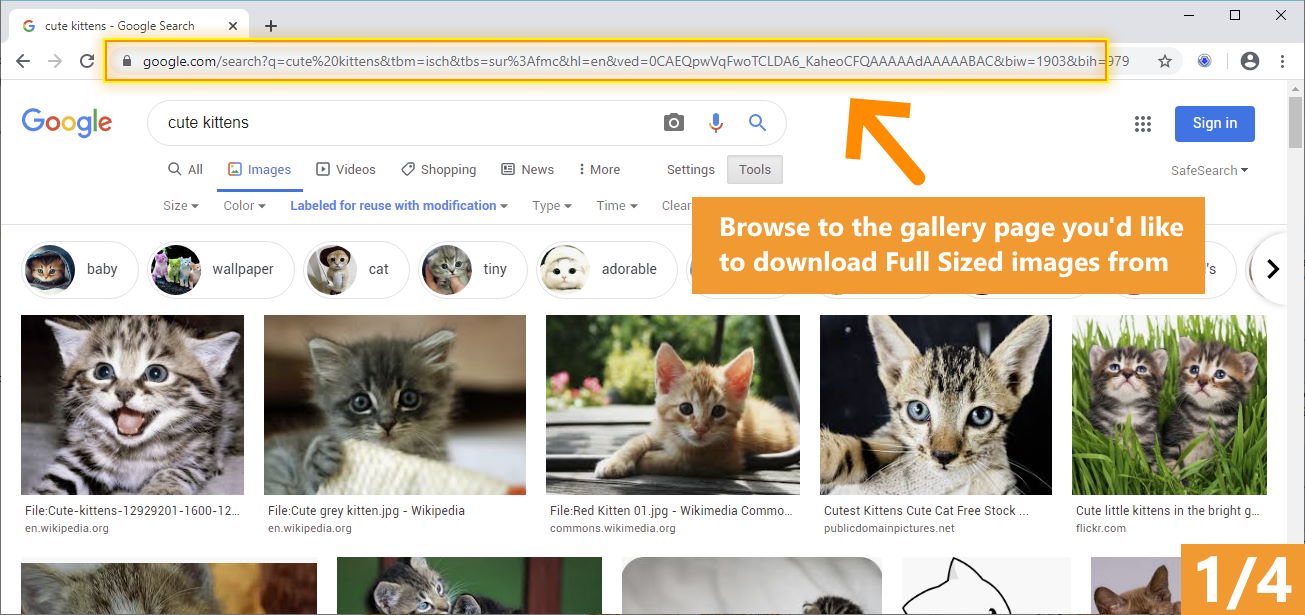
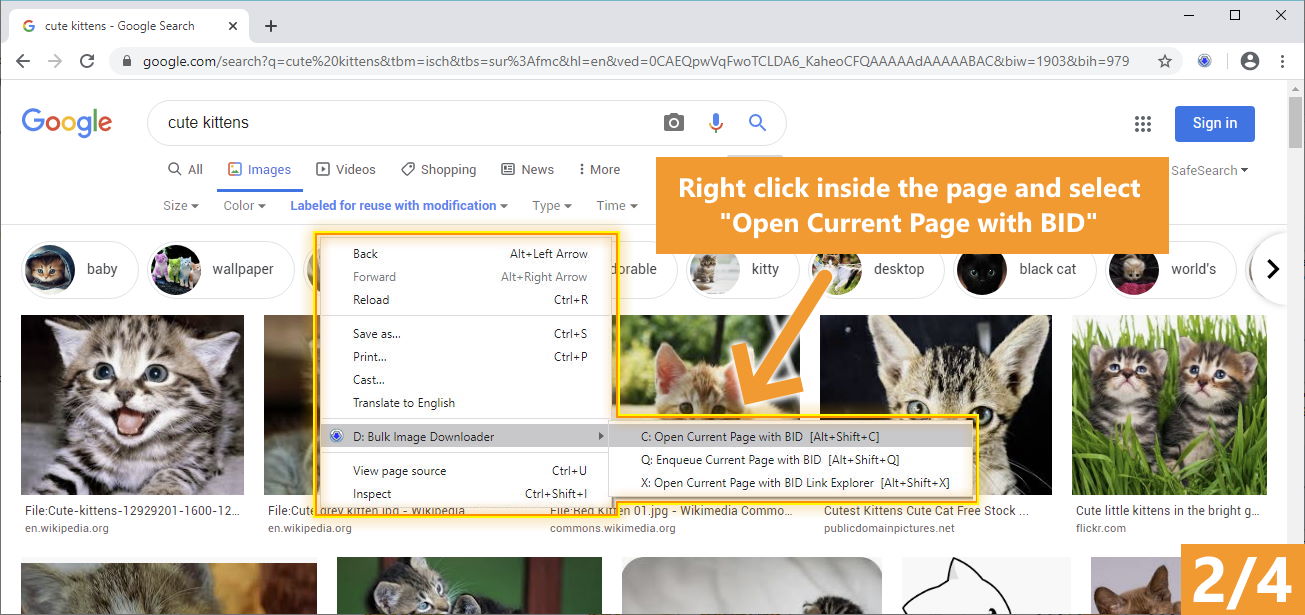
If the current web page you're viewing contains a thumbnailed image gallery simply right click inside the window and select "Open current page with Bulk Image Downloader". Alternatively if the page contains links to thumbnailed image galleries right click on one of the links and select "Open link target with Bulk Image Downloader". Either of these actions will launch BID and cause it to immediately scan the page or link for downloable images. Alternatively start BID manually and copy and paste the URL of the web page containing the images into the "URL to page containing links" edit box. Click on "Scan URL for images" to bring up a list of images that B.I.D. is capable of downloading.
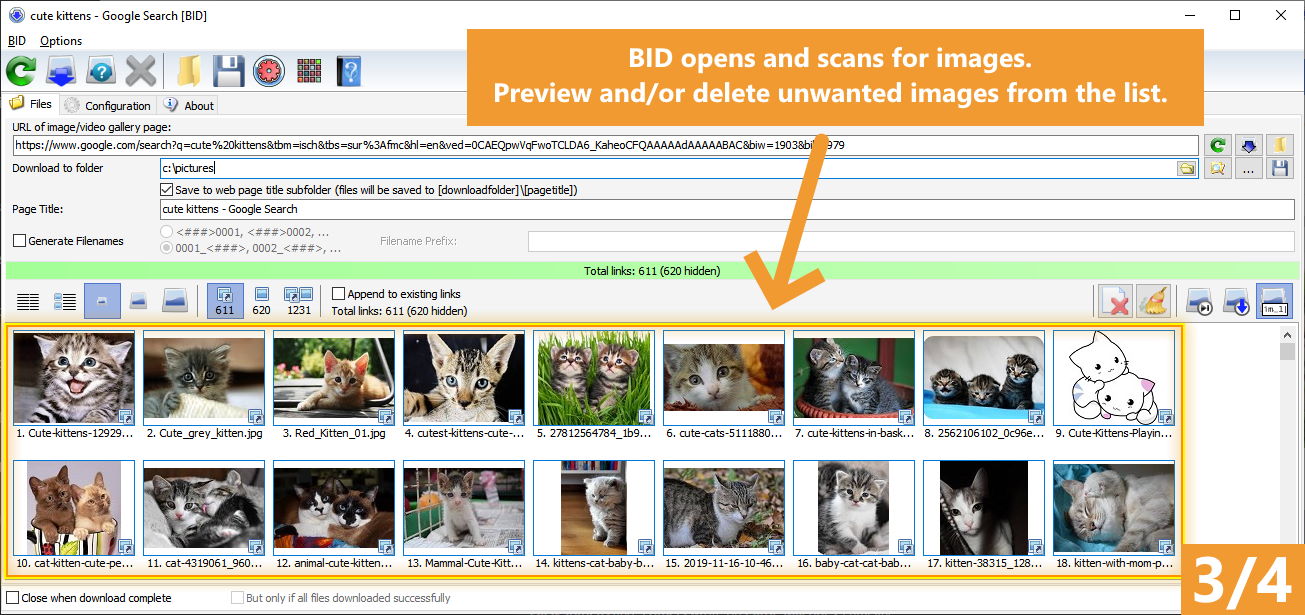
Once BID has presented you with a list of images select the ones you don't want and press the Delete key to remove them from the list. You can select multiple images by holding down the Ctrl key while clicking with the mouse.
Double click on an image to display the full sized thumbnail. Double click the thumbnail image to download and display the full sized image.
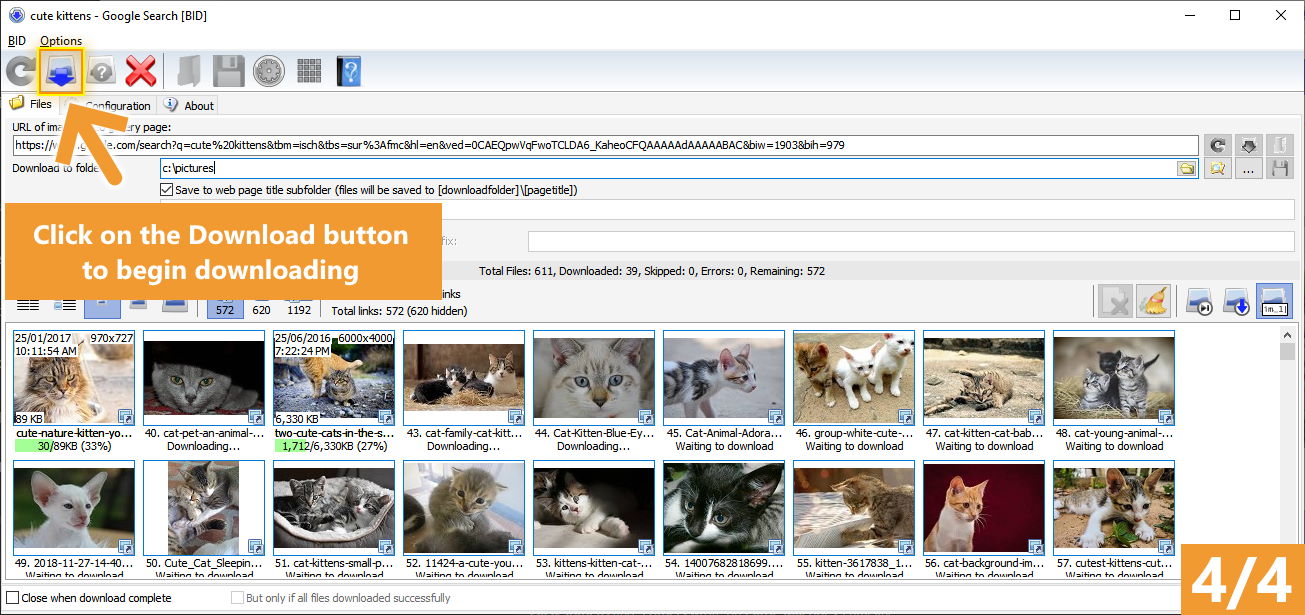
Select a download folder and then click on "Download files" to begin downloading the images.
Click on "Save Batch" to save the download links to a text file. These ".bidlist" saved files can be loaded into B.I.D. by clicking on the "Load Batch/Scan links from file" button.
To create a list from multiple sources check the "Append to existing links" checkbox. Links will now be appended to the list instead of replacing the existing list when a URL is scanned or a file is loaded.
Some image hosts scramble the image filenames. In such a case you can select the "Generate Filenames" checkbox and type in an image prefix. Images will be saved as "PREFIXnnn.jpg" where nnn is the image's sequence number on the list.
The "Thumbnails" checkbox toggles the display of image thumbnails within the list.
If "Close when download complete" is selected, B.I.D. will close automatically after the last image in the list has been downloaded.
Click on "Add to Queue" to have the current batch saved and sent to the Queue Manager.
|
|||||
| < Prev | Next > |
|---|